The session report

The report is the document your client keeps after a session.

Every other tool in this market hands the practitioner a dashboard. Slide Practice hands the client a document, and this page is that document, section by section.

A session report is the written summary your client reads after a session: what went well, what you noticed about their work, what they agreed to do before next time, and what the next session opens with. Slide Practice drafts it from the session recording, in about a minute, for you to check and send.

Try it on one session One session, measured end to end

01What is in it

Four sections, in the order a client reads them.

This is the report itself, rendered as the app renders it. Maya is a made up student at a made up tutoring centre, so the session inside it is invented and the document around it is exactly what a client opens.

Session7 of 12

DateTue 9 June 2026

ClientMaya R.

Duration45 min

Algebra with Maya R.

Winswhat went well

  • Used the four steps unaided on the last three problems, the harder kind where the number in front of the squared term is not one.
  • Asked why the splitting method works, the first time she has asked that in these sessions.

Insightswhat was noticed

  • The gap was never the arithmetic: she was guessing factor pairs rather than splitting the middle term, so a problem that did not resolve in two guesses became a dead end.
  • Written as four steps, the method gives her something to follow when a guess fails.

Commitmentswhat they agreed to do

  • Practice set four, problems one to twelve, using the four steps rather than guessing.Before Thursday.
  • Time herself on five problems, ten minutes, and bring the ones she could not finish.Before the next session.
  • Redo the two quiz questions we went through, from a blank page.Done in the session.

Next focuswhat the next session covers

Start the next session with the timed set she brings back. If the four steps hold under time pressure, move on to solving by completing the square. If they do not, spend the first twenty minutes there rather than adding anything new.
Recorded with permission, confirmed on Tue 9 June 2026. Sent by Her tutor at Northline Tutoring.

  • Wins

    What went well in this session, written as something a client or a parent can repeat to somebody else.

  • Insights

    What you noticed that they may not have: the habit behind the mistake, the thing that is working better than they think.

  • Commitments

    What they agreed to do before next time, each one with a date and a tick box beside it.

  • Next focus

    What the next session covers, which is the line clients read first and almost never get told.

The same four sections carry a coaching session, a training block or a consulting call. What changes is the voice: a report about a student is phrased for the parent who pays, and a report about an adult is phrased for the adult who sat in the session.

02Where the words come from

Every line is something that was said in the session.

The draft is made from the words of the session and nothing else: the recording you upload, or a transcript you paste. If a chapter, a deadline or a diagnosis was never mentioned out loud, it is not in the report, and the drafting does not invent a compliment nobody made.

Before anything is drafted you confirm on screen that everyone in the session agreed to be recorded. The server reads that confirmation rather than trusting the button, and when the client is under 18 the parent or guardian is the person who agrees.

A draft is usually ready about a minute after the upload finishes. Uploads on the free sample run to 10 minutes and 25MB, and to the limits of your plan on an account.

The meeting recorder is not live yet. Uploads work on every plan. A session held on Zoom or Google Meet is recorded by you, in the software you already teach or coach in, and the file is uploaded like any other.

app.slidepractice.com/dashboard/recaps
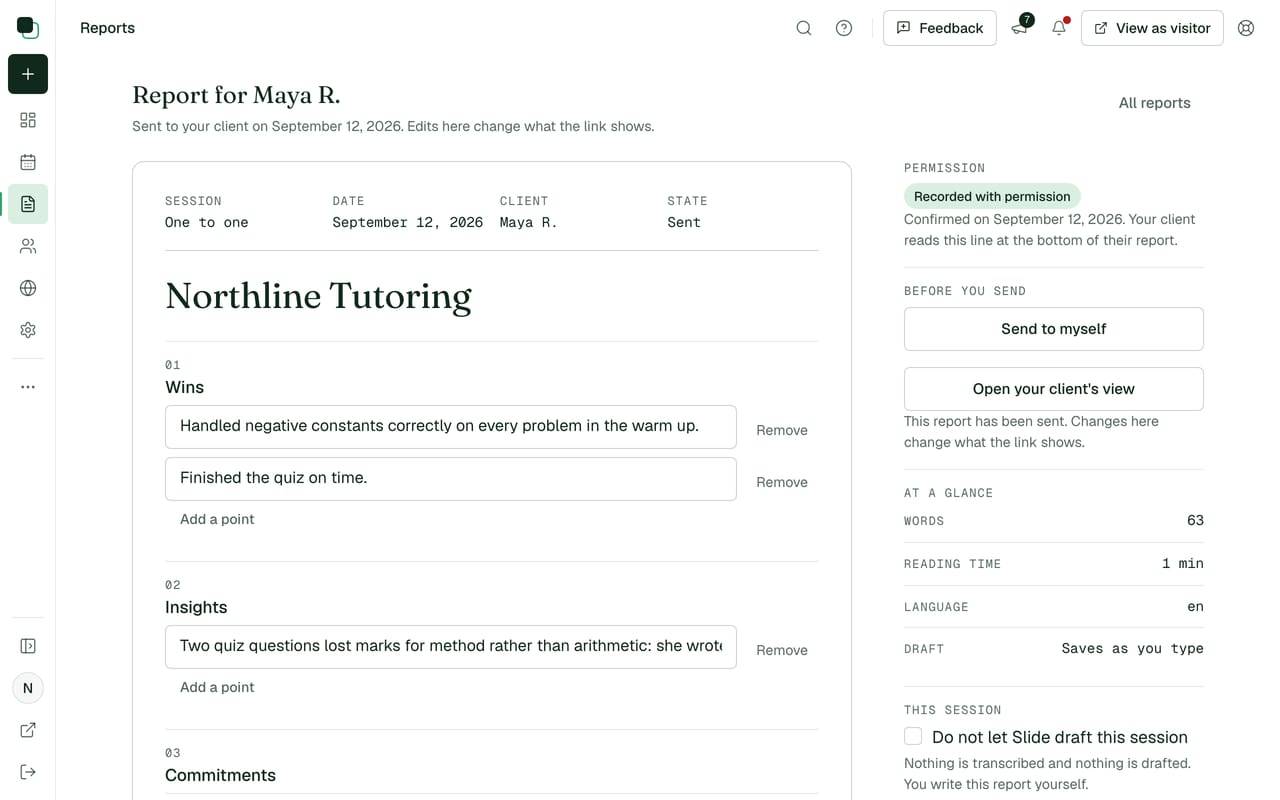
The report editor in Slide Practice, with the four sections of a drafted report and the practitioner's cursor in the wins section.
The report editor, one session drafted and waiting to be read.

03Your edit, your name

You read it, change what you like, and send it yourself.

The editor is where the draft stops being ours. Correct a name the recording misheard, move a commitment to the right Thursday, cut a section that does not apply, and write in the sentence you would have said at the door. Your client never knows there was a draft.

It goes out from your name with your reply address, so a client replying to the report replies to you. The same words appear on the client's page, where they sit above everything the client agreed to do.

Nothing sends without you. There is no automatic send, and there is no setting that turns one on.

04Your own record

Every report you have sent stays in one list.

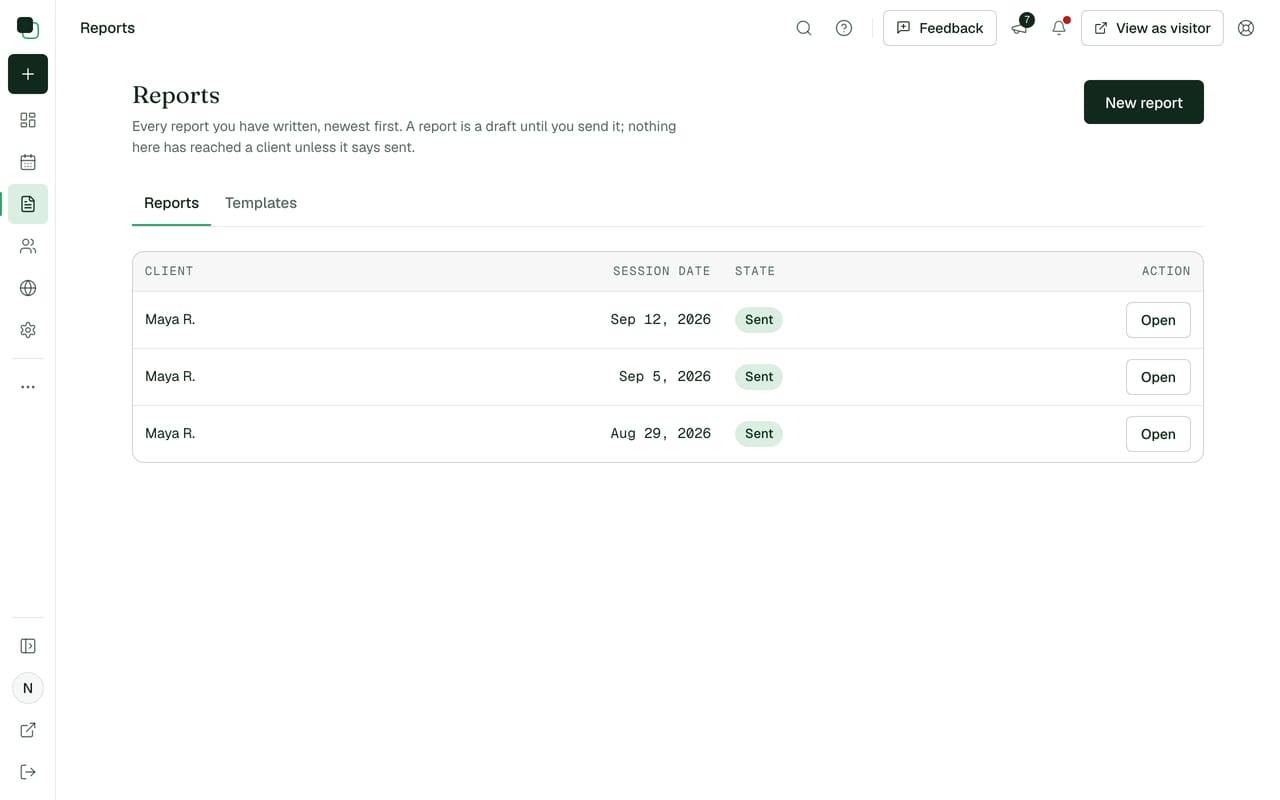
Newest first, with the client and the session date on each row, so the question of what you covered in March has an answer that takes one click. Reports, their text, your clients and your bookings all export as a CSV at any time.

The recording is deleted as soon as the report is written. The report is kept until the account is closed, which is what makes a run of them worth reading: four in a row show a term of work without anybody writing a summary of it.

Under each report on the client's page sits the link to book the next session, which is the booking page doing its half of this. The whole sequence, from the recording to the page your client keeps, is on the product page.

app.slidepractice.com/dashboard/recaps
The list of reports in Slide Practice, newest first, with the session date and the client's name on each row.

05What a report costs

Plans are counted in reports, and nothing else is counted.

What one practitioner pays a month, and how many reports that holds.
PlanA monthReports a month
Starter$14.9920
Pro$29.99200
Max$49.99500
  • Clients, sessions and bookings are unlimited on every plan. Reports are the thing that is counted, and one past your allowance is $0.99.
  • The trial is 7 days with 5 reports and no card, which is a normal week of sessions for most practitioners.
  • What a client pays you for a session is yours. Slide never holds that money and takes no share of it.

Paid plans open when card payments go live. Your trial keeps going at no charge until then. Every allowance, line by line, is on the pricing page.

06Questions

What practitioners ask about the report itself.

Questions about the session report

How many reports does a plan include?
Starter includes 20 reports a month, Pro includes 200 and Max includes 500. One past your allowance is $0.99, and clients and sessions themselves are never counted.
Can I change a report before my client reads it?
Always, and you have to: a report is a draft until you press send. You can rewrite a sentence, delete a section, add the thing you only thought of afterwards, or write the whole report yourself in the editor.
What if I have no recording of the session?
Paste a transcript from Zoom, Teams or Otter, or type your own notes, and the report is drafted from that instead. A session nobody agreed to record can still be written up by hand and sent from Slide.
What happens to the recording and the report afterwards?
The recording is deleted as soon as the report is written. The report is kept until the account is closed, so a client can open a session from October in June, and you can export every report and its text as a CSV whenever you want it.

Read the report your own last session would have produced.

Bring one recording, or paste one transcript, and read the four sections a client of yours would have opened that evening. No account and no card, and the text is deleted after 24 hours unless you save it.

Start the 7 day trial Use the free sample first