For life, business and ICF coaches
Every coaching session ends with the written report your client keeps.
Slide Practice is software for coaches that drafts the written report after every session, from a recording made with permission, so the client leaves with what was decided and what they agreed to do. Life coaching, business and executive coaching, and ICF credentialed practice all run on that record.
The hour is the part you trained for. The part that takes the evening is writing it up afterwards, for every client, while you can still remember the phrase they used. Slide drafts that from the recording, you read it, and it goes out under your name.

01One session
What a coaching session looks like with Slide in it.
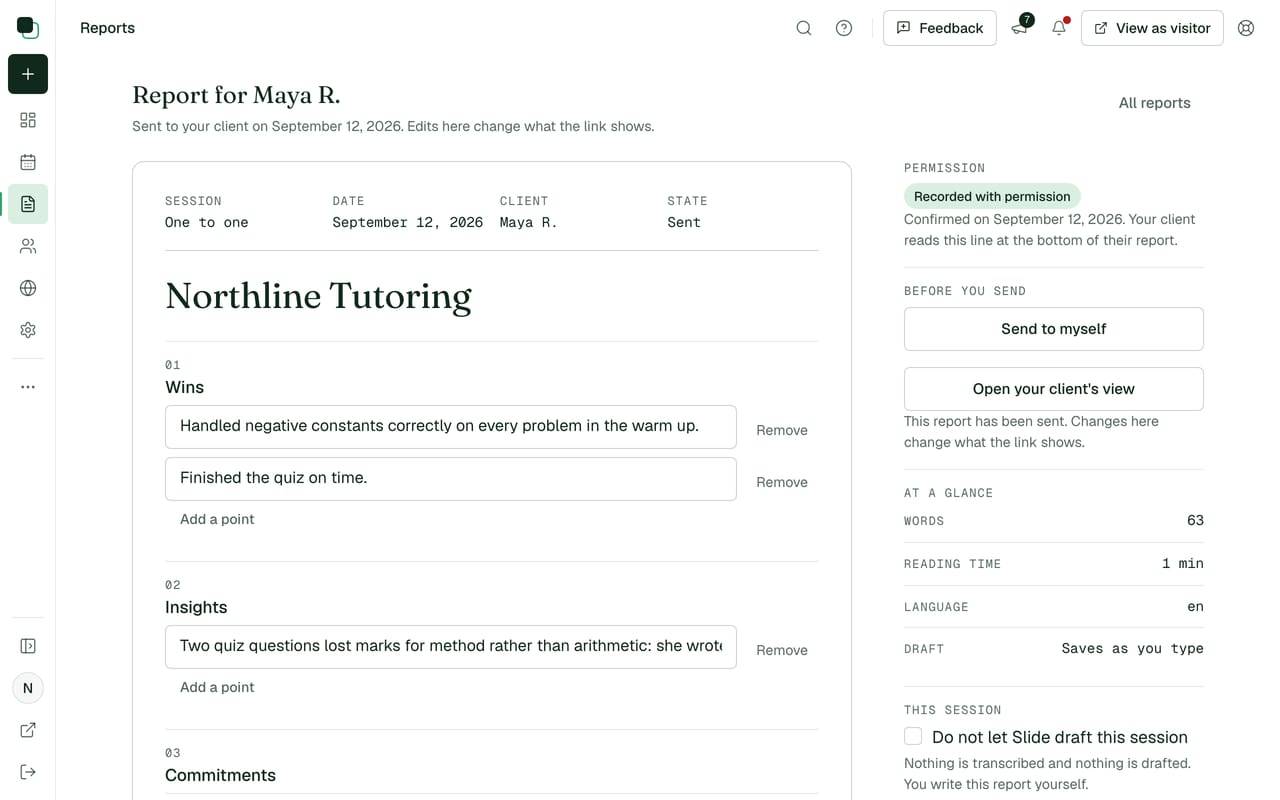
The report is the written summary your client receives after a session: what went well, what you noticed, what they agreed to do before the next one, and what that next one covers.
Run the session the way you already run it, in a room or on a call. Record it on your phone, your laptop or the call software you coach on, and confirm on screen that everyone in the session agreed to be recorded. The meeting recorder is not live yet. Uploads work on every plan.
Upload the file when the call ends, or paste the transcript your call software already wrote. About a minute later the four sections are drafted and waiting in the report editor, where you cut the line that misses the point, sharpen a commitment into a date, and send.
The recording goes as soon as the report is written, and the report itself is kept until the account is closed. A client who would rather not be recorded does not cost you the report: you write that one by hand in the same editor, and it reaches them the same way.
02The report
Four sections, written for a client who has to decide something.
Not a transcript and not minutes. A coaching client wants to know what they said they would do, and to be held to it next week without being read a paragraph twice.
A coaching report, four sections
Winswhat went well
She asked her director for the week before the board paper was due, and got it. The second time she asked, she did not rehearse it first.
Insightswhat was noticed
The pattern is not confidence. She asks for time only once somebody else has named the deadline, so the ask always arrives late.
Commitmentswhat she agreed to do
Name the date herself in Thursday's planning meeting, before anyone else does. Write the one line she wanted to say and did not.
Next focuswhat the next session covers
Whether naming the date changed the meeting, and the two conversations she has been moving to next week since April.
The four names are the report's own, on every report Slide drafts. The sentences above are a made up client of a made up coach, written for this page, because the sample session this site ships elsewhere is a tutor and a student working on quadratics.
Commitments carry a date and a tick box rather than sitting in a paragraph, which is the difference between a client who remembers three things and a client who remembers that the session went well. How the four sections are drafted takes one apart line by line.
A report is never a verbatim record of the hour. It holds what was said that the two of you will act on, which is what a coach would have typed up at nine in the evening.
03The client's page
Your client reads it, ticks what they did, and books the next one.
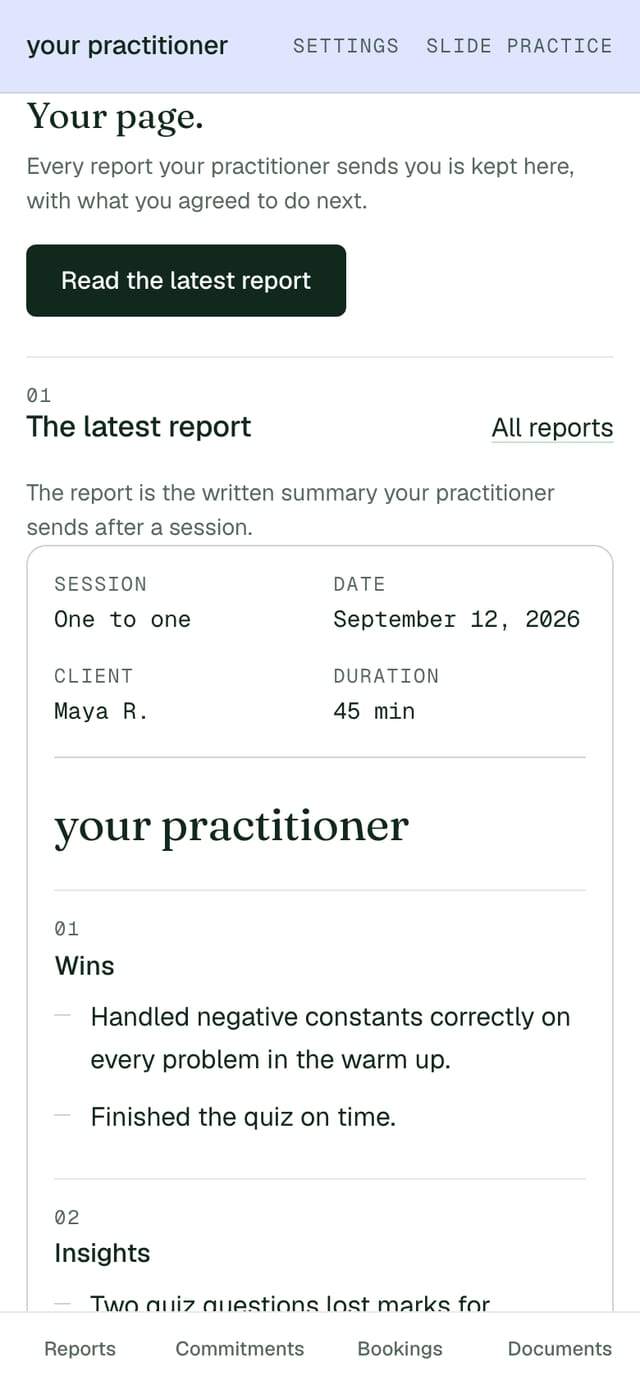
Every report you send lands on the client's page: their own page, with every report you have written and everything they agreed to, newest first. There is no password. They open the link in their email, and they can save the page to keep coming back to it.
The commitments are tick boxes on that page, so a client who did the thing on Tuesday says so on Tuesday, and you open the next session already knowing. Accountability between sessions stops being a question you have to ask in the first ten minutes.
You can see that a report was opened, and when. Documents you share sit there too, next to the link to book the next session. What is on the client's page shows all of it, and the page written for clients is what you send a client who has lost their link.
04ICF hours
Every session you upload adds to your coaching hours log.
A credential is a record kept over years. Rebuilding one from a calendar the month you apply is how a coach ends up guessing at their own work.
When your profession is set to coach, the app carries an hours log. Each session you upload puts a row in it: the date, the client, how long the session ran and whether it was paid or pro bono. You confirm the duration, correct anything that is wrong, and export the log when you are ready to report it.
That covers a coach working toward an ACC, a PCC or an MCC alike, because all three ask for client coaching hours you have logged yourself. The ICF moves its requirements, and this page does not quote them: read the current rule on the ICF's own site before you apply, and treat the export as what you base your report on rather than the report itself.
If you want to know where you stand before you have an account at all, the ICF hours calculator adds up what you have already coached in the browser, and keeps nothing.
| Session | Paid or pro bono | Hours |
|---|---|---|
| Leadership session, one to one | Paid | 1.0 |
| Career session, one to one | Paid | 1.5 |
| Practice client, building hours | Pro bono | 0.75 |
One thing this log is not: Continuing Coach Education. Those units come from training, not from coaching, and Slide does not award or count them. A tool that told you it handled your whole credential would be selling you a surprise.
05What it costs
One price a month, and no share of your coaching fee.
| Plan | Reports a month | A month |
|---|---|---|
| Starter | 20 | $14.99 |
| Pro | 200 | $29.99 |
| Max | 500 | $49.99 |
A report is one drafted session. Past your plan's count, another is $0.99, and nothing stops working while you decide. Every account starts with a 7 day trial and 5 drafted reports, with no card to hold it open. The first 30 founding practitioners get Pro at $19 a month for 12 months, then $29.99.
Whatever your client pays you arrives in full. Slide takes no commission on a coaching fee, on any plan, and never sits between you and the money: clients pay on your own link, and the 14 day money back window applies to what you pay Slide, not to what they pay you.
Allowances, the annual price and what happens at the end of the trial are all on the pricing page. If you would rather follow one session the whole way through before reading a price, the product page does that from the recording to the sent report.
06What it does not do
Four things Slide does not do for a coaching practice.
-
Not a way to find clients
Slide runs no marketing for you, generates no leads and does not rank one coach against another. It looks after the clients who are already yours.
-
Not your education record
Continuing Coach Education comes from approved training, not from coaching sessions, so Slide neither awards nor counts a single unit of it.
-
Not a payment processor
Your client pays you on your own link, by transfer or against an invoice you raise yourself. Slide never holds a coaching fee and takes no share of one.
-
Not an automatic sender
No report reaches a client until you have read it. There is no automatic send on any plan and no setting that turns one on.
Keep the tools that already work. A coach who runs sliding scale rates, a health practice or a set of engagements rather than open ended coaching will find the neighbouring pages closer to the mark: reports for health and nutrition coaches, or the engagement record for consultants.
07Questions
What coaches ask before the first upload.
Questions coaches ask about the report
- What happens when a client does not want to be recorded?
- Nothing is drafted for that session. Permission is confirmed on screen before anything is uploaded, and the server reads that confirmation rather than trusting the button, so a session without it produces no draft. You can still write the report by hand in the editor and send it from Slide.
- Will it sound like me or like a machine that listened in?
- It will sound like the session, which is the point: the draft holds what was actually said and nothing it was not told. Most coaches cut a line, sharpen one commitment and add a sentence of their own before sending, which takes about two minutes.
- Does it count my coaching hours on its own?
- It adds the duration of each session you upload to the log, and then waits for you. You confirm the time, mark the session paid or pro bono, fix anything that is wrong and export the log yourself. The number you submit is one you have read.
- Can I add sessions I coached before I had an account?
- Yes. Older recordings and pasted transcripts both go in, and each one lands in the log with the date you give it, so a year of coaching you have already done does not have to be rebuilt from your calendar.
- Does it handle group coaching or a fixed programme?
- No. Groups and multi session programmes are built and switched off, so nothing on this page describes them as available. Slide handles one to one coaching, one session at a time, and says so rather than letting you find out in week three.
Bring one coaching session and read what your client would receive.
One recording or one pasted transcript, no account and no card. You get the four sections back in about a minute, the audio goes as soon as the report is made, and the report itself is deleted after 24 hours.