Business software for independent tutors, coaches, trainers and consultants, and for agencies and firms.
Clients book a time on your booking page and pay you directly. After each session, we draft the written report you send them. Independents work from one account, and agencies and firms pay one bill for the whole team. When you want more clients, Growth runs ads for you on Facebook and Instagram.
Free plan. No card.
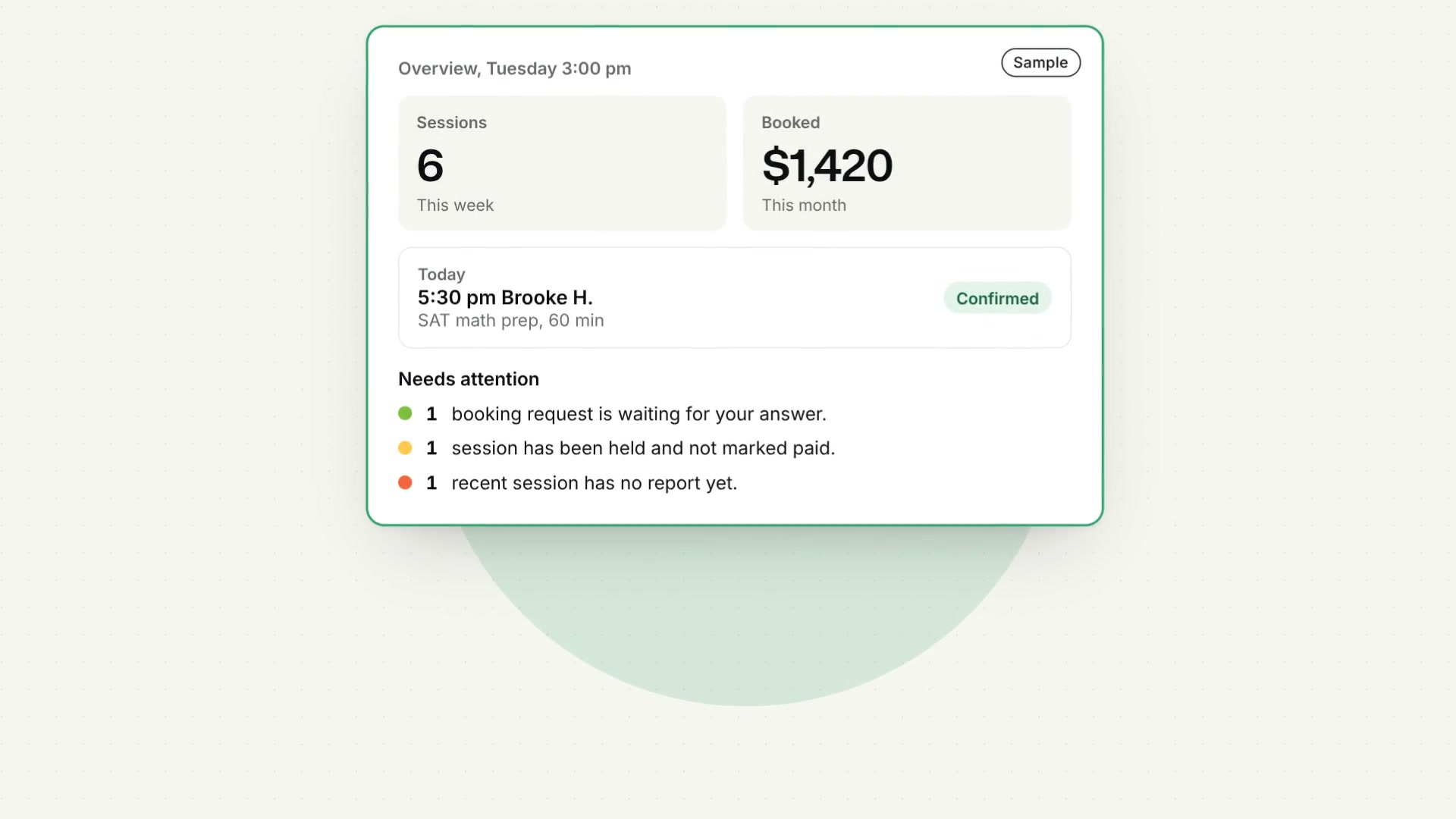
Overview
SampleDaniel Reyes, math tutor, is made up.
Sessions
6
This week
Booked
$1,420
This month
Clients
5
1 new, 4 returning this month
Reports opened
10
Of 11 sent this month
Today
- 5:30 pmBrooke H.SAT math prep, 60 minConfirmed
Coming up
- Tomorrow4:30 pmMarcus J.Algebra 2, 50 minConfirmed
- Tomorrow7:00 pmHannah K.Homework help, 30 minConfirmed
Needs attention
- 1booking request is waiting for your answer.
- 1session has been held and not marked paid.
- 1recent session has no report yet.
Set a budget of $150 to $300 and we’ll write the ad, show it to you first, and run it on Facebook and Instagram for 7, 14 or 30 days. Every click goes to your booking page. Our fee is 25% of the budget, and at least $7.
Open GrowthDaniel Reyes
Austin, Texas, and online
Math tutorTimes are in Central Time (US), Daniel Reyes’s time zone.
WedNext available
See all the times
Watch the tour
All six parts in 76 seconds, on a sample math tutor’s account.
Transcript
Slide Practice, the tour (1:16)
This is Slide Practice.
Business software for independent tutors, coaches, personal trainers and consultants.
It has six parts. Here's what each one does.
Front desk. Clients book a time on your own booking page, and a request that clashes with your Google Calendar is turned away.
Billing. Clients pay you directly, on your own PayPal, Stripe or GCash link, and we take no commission.
Records. After each session, upload the recording. We draft the written report, and you check it and send it under your name.
Growth. Want more clients? We build an ad from your booking page, you approve it, and we run it on Facebook and Instagram.
Team. Run an agency? Everyone gets their own page, every report carries your logo, and you pay one bill.
And the Overview shows what's booked and what's waiting, on one screen.
For the details, open Product. Solutions shows your kind of work, and Pricing shows every plan.
When you're ready, press Start free. No card needed.
Slide Practice. slidepractice.com.
The screens are samples: Daniel Reyes and his clients are made up.
The voice in this video is generated with AI.
Read one tutor’s week, day by day
See it for your kind of work
Integrations
Connect the tools you already use
Most tutors and coaches keep their calendar, payment links, call recordings and notes in four places. Slide Practice brings them into one account.
Before: four places
- Your calendar
- Payment links
- Call recordings
- Notes and spreadsheets
After: one account
Slide Practice
- Your calendar
- Payment links
- Call recordings
- Notes and spreadsheets
What each one does here
-
Google Calendar
For use with Google Calendar.
-
PayPal
Paste the payment link from your own PayPal account, and clients pay you there.
-
Stripe
Paste a payment link from your own Stripe account, and clients pay you by card on a Stripe page.
-
Wise
Paste the payment link from your own Wise account, and clients pay you through Wise.
-
 GCash
GCashAdd your GCash number and the name on the account, for clients who pay that way.
-
Zoom
Record the call in Zoom, then upload its sound or paste its transcript.
-
Google Meet
Google Meet saves a video, so export its sound as an MP3 and upload that, or paste the transcript.
-
Microsoft Teams
Teams saves a video as well, so export the sound as an MP3 first, or paste the transcript.
-
 Otter.ai
Paste a transcript from Otter instead of uploading a recording, and the report is drafted from that.
-
Facebook
Each ad is published from the Slide Practice page on Facebook with the Sponsored label Meta requires, and every click goes to your booking page.
-
Instagram
The same ad runs on Instagram, from the Slide Practice page and with the same Sponsored label, and every click goes to your booking page.
-
Paddle
Paddle takes the payment for your plan as merchant of record and handles the card, so Slide Practice stores no card number.
See every integration and how each one works
Product names and logos belong to their owners. Slide Practice is not affiliated with or endorsed by them.
From our co-founders
My work is making delivery teams efficient at scale. A tutor rewriting the same report by hand every evening is the same problem at the smallest scale, and nobody had bothered to solve it.

I started with research: how tutors, coaches, trainers and consultants who work for themselves run their week, and which parts of it nobody was left to do for them. Slide Practice is what I built about it, department by department, with my co-founder.

Front desk
Clients book on your own page
Send one link in place of the texts about times. It shows your services, prices and hours, a client asks for a time without making an account, and nothing is booked until you confirm.
- Connect Google Calendar and a request that lands on a busy time is turned away.
- Your client gets a reminder the day before.
Front deskSample
Algebra 250 min$60
SAT math prep60 min$75
Homework help30 min$35
Four SAT sessions4 sessions$270
Weekly hoursThe days you work, and the hours on eachSaved
Monday15:00to20:00
Tuesday15:00to20:00
Wednesday15:00to20:00
Thursday15:00to20:00
Friday15:00to20:00
Billing
Clients pay you directly
After booking, a client sees your own payment link and pays you there. We never hold the money.
- PayPal, Stripe or GCash, or your own instructions, such as a bank transfer.
- A package offers several sessions at one price.
- An invoice with your own details can be made when a client asks for one.
BillingSample
What a client sees after booking
4:30 PM
50 min · $60
Pay with PayPalWhat clients have paid
Tyler B.$60Paid
Jake W.$35Unpaid
Brooke H.$75Paid
Records
The report after each session, drafted for you
You no longer write the follow-up from memory. Upload a recording from your phone or a Zoom call, or paste a transcript, and we draft what went well, what you noticed and what comes next. You check it and send it under your name.
- Each client reads their reports on a page of their own.
- You’re told the first time a report is opened from the button in its email.
RecordsSample
Brooke H.
SAT math, session 5 of 8Opened
SAT math, session 4 of 8Opened
SAT math, session 3 of 8Opened
Commitments
Practice set 4, questions 1 to 20, by Tuesday.
Circle the units in every answer.
Math sections of practice test 2, by Thursday.
Growth
When you want more clients, ask for an ad
We write the ad from your booking page and show it to you first. Once you approve it, a person publishes it, and each click opens your page.
- You choose the budget, $150 to $300, over 7, 14 or 30 days.
- Our fee is 25 percent of the budget, added on top and shown before anything is spent.
- No ad account needed. It runs from our page on Facebook and Instagram.
GrowthSample
Advertising budget$250
Service fee$62.50
Run length14 days
Total$312.50
Send this campaign for reviewRuns onFacebook and Instagram
Every click goes toapp.slidepractice.com/p/daniel-reyes
Published byA person, once it is paid for
Team
One account for the whole team
Agencies and firms give each person a seat, with a booking page and clients of their own. As the owner, you pay one bill and can open any report the team sends.
- $99 a month is Firm 5, with 5 seats and 400 reports to share.
- $149 a month is Firm 15, with 15 seats and 1,000 reports to share.
TeamSample
ProfessionalSeatReports this month
Daniel Reyesdaniel@example.comJoined11
tutor@example.comInvited0
Reports this month, shared11 of 400
Before you sign up
Free gives you a booking page, payment on your own links and 3 reports a month, with no end date. Professional is $30 a month for 200 reports, with no commission on what you earn.
A session of up to 90 minutes counts as one report. The first 30 Professional accounts pay $19 a month for 12 months. Pay by the year and 2 months are free.
Recordings and permission
Nothing is drafted until you confirm that everyone agreed to the recording, and for a client under 18, a parent or guardian agrees. Once the report is drafted, the recording is deleted within a day. Each client sees only their own reports.
Who runs Slide Practice
Slide Practice is built in Manila by its two co-founders, who read and answer their own messages.
- Namrata RattanChief Executive Officer
- Vivaan SinghChief Technology Officer
Questions people ask
What is Slide Practice?
Business software for independent tutors, coaches, personal trainers and consultants, and for agencies and firms with a team. One account holds your booking page, payment on your own links, a record for every client with a written report after each session, and advertising we run for you when you want more clients.
How do clients book and pay?
They pick a time on your booking page and you confirm it. A request that clashes with your Google Calendar is turned away. They pay on your PayPal or Stripe link, a GCash number or your own instructions, so the money goes straight to you and never passes through us.
What is in a session report?
What went well, what you noticed, what your client agreed to do and what comes next. You upload a recording or paste a transcript, we draft the report, and you read it, edit it and send it under your name. Read a sample report.
Does it work for an agency or firm with a team?
Yes. Firm 5 and Firm 15 give every person their own seat, booking page and clients, with one bill and a shared allowance of reports, and the owner can read every report sent under the business’s name and logo. For agencies and firms.
Do I have to move my clients over from another tool?
No. You can start by sending your booking page to the clients you already have. If you are leaving another tool, the guides for moving say what to bring and how.
Is Slide Practice a marketplace?
No. Nobody is ranked and no client is sold as a lead. Your clients come from your own booking page, and Find a professional lists only the people who choose to be listed.
Hear about Vivaan and Slide Practice from others
Feedback from people outside the company, printed word for word. Each one says how they know us.
I’m a friend of Vivaan’s and have followed Slide Practice from the start. I’m not a customer, so this is my honest view as a founder. What stands out is the model: one account for booking, payments, client records and session reports, with no commission, so tutors keep what they earn and don’t juggle four tools. Vivaan is the kind of CTO who decides quickly and tests with real users. When two tutors told him they value writing their own notes, he reshaped the session report into the parent’s version of those notes, not a replacement for them. If I had one thing to improve, it would be getting it into more tutors’ hands sooner, because the product is further along than its user count. If you teach or coach, it’s worth trying Slide Practice at slidepractice.com.
Make your booking page tonight and send your first report after your next session.
Sign up with no card, add your services and prices, and send the link to the people you already work with.